NEW VMware vSphere module for WHMCS

Sell VMware servers.
Ready in minutes.

A client orders and pays in WHMCS, and gets a ready server on your vCenter: IP, password and login email included. Power, console, reinstall, snapshots and billing all run on their own.

From $7.90 / monthFree updates10 languages
yourhost.com/clientarea.php?action=productdetails
DC VMware client area: server status, IP, power buttons, console and live usage
✅
Order #1287 paidServer ready, login email sent
⏱
Hourly billingCounted every minute
8OS families
10languages
1 minhourly billing step
1 clickmodule updates
7 & 8vCenter versions
The panel

What your clients see

Real screens of the client area, inside your own WHMCS, with your brand.

yourhost.com/clientarea.php?action=productdetails
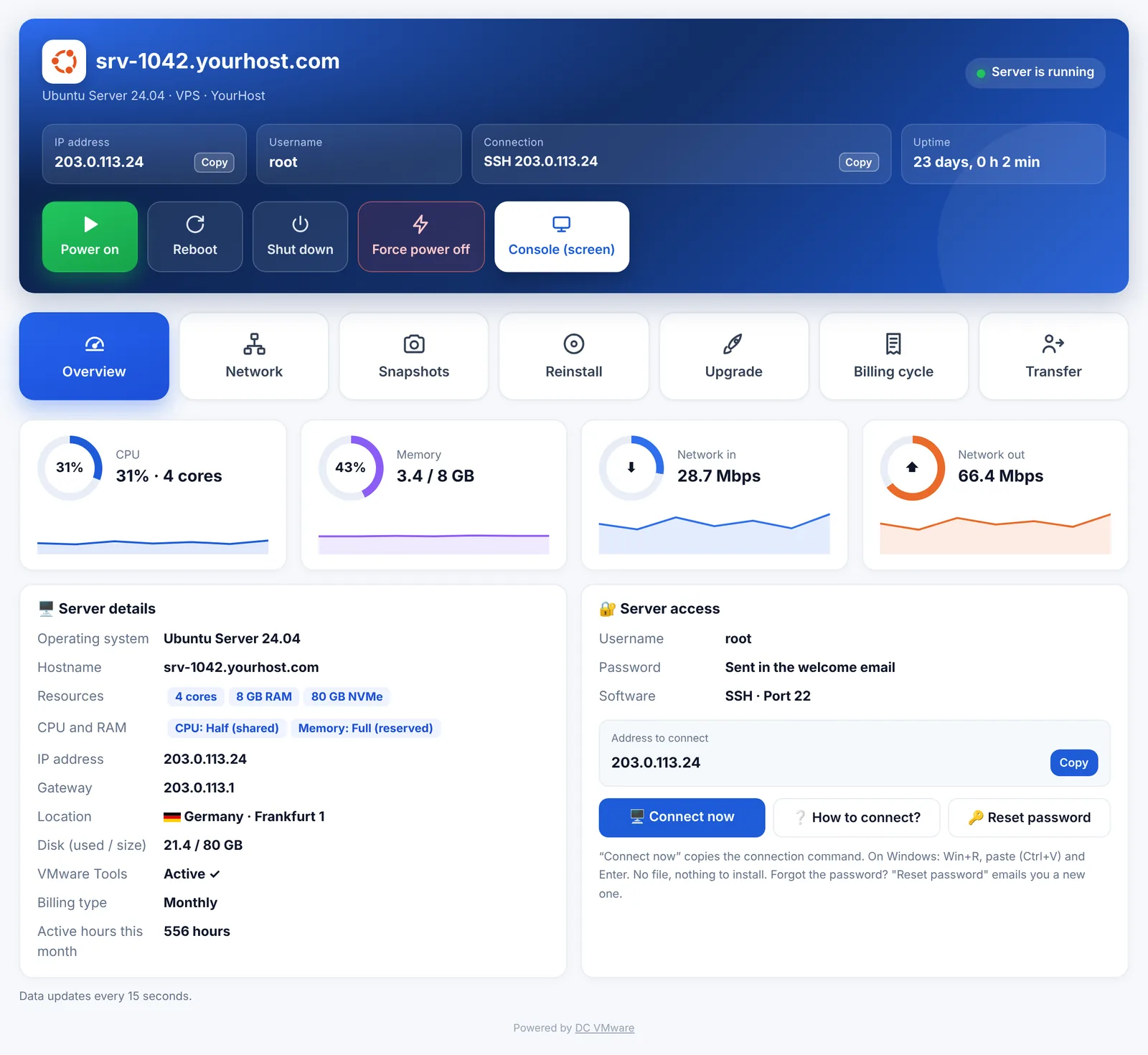
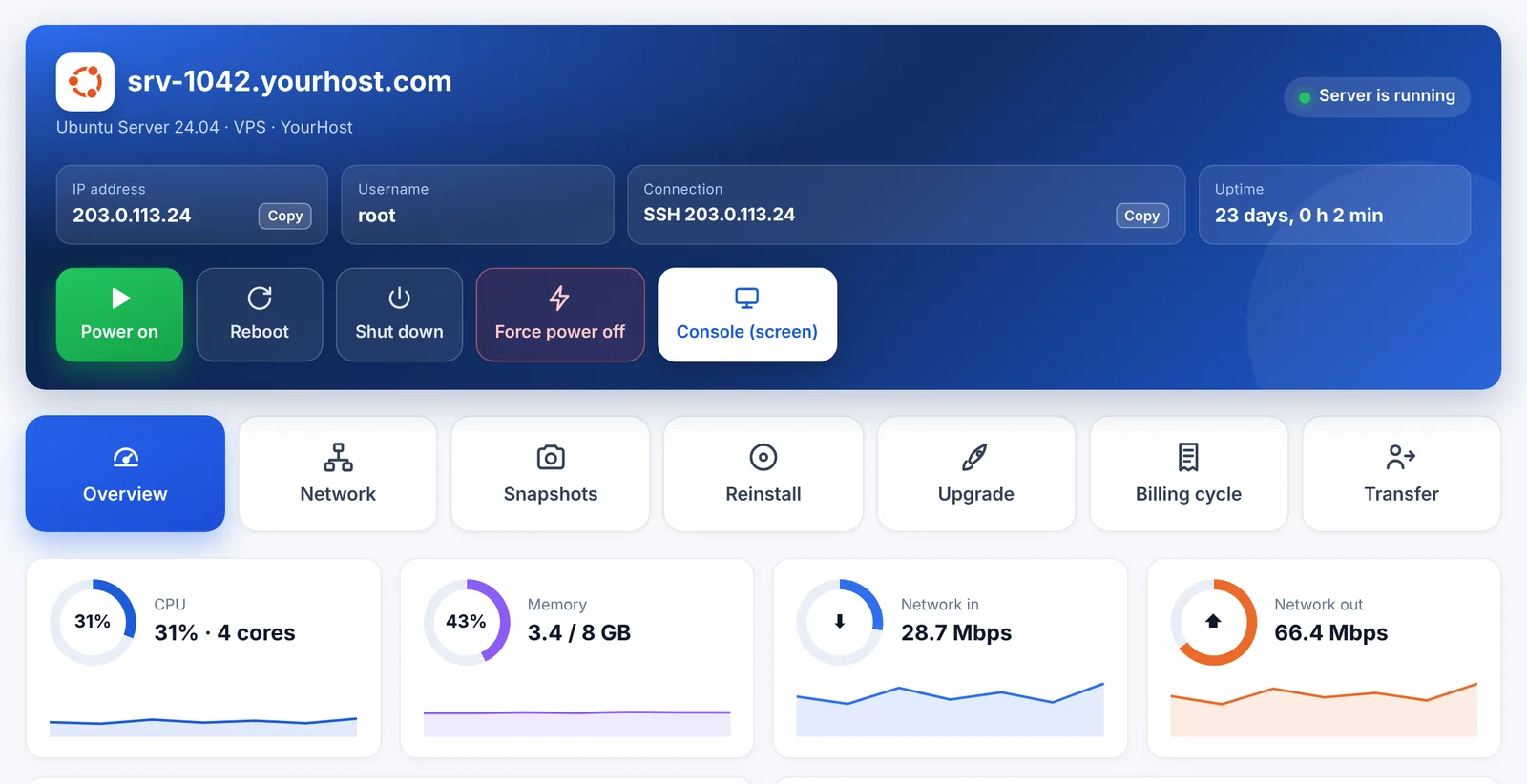
DC VMware client area: Overview

Everything about the server on one screen

The status, IP, user name, uptime and live CPU, memory and network. Power buttons and the browser console are always at the top.

  • Live usage, refreshed on its own
  • Copy the IP and the login in one click
  • SSH or RDP details ready to use
yourhost.com/clientarea.php?action=productdetails
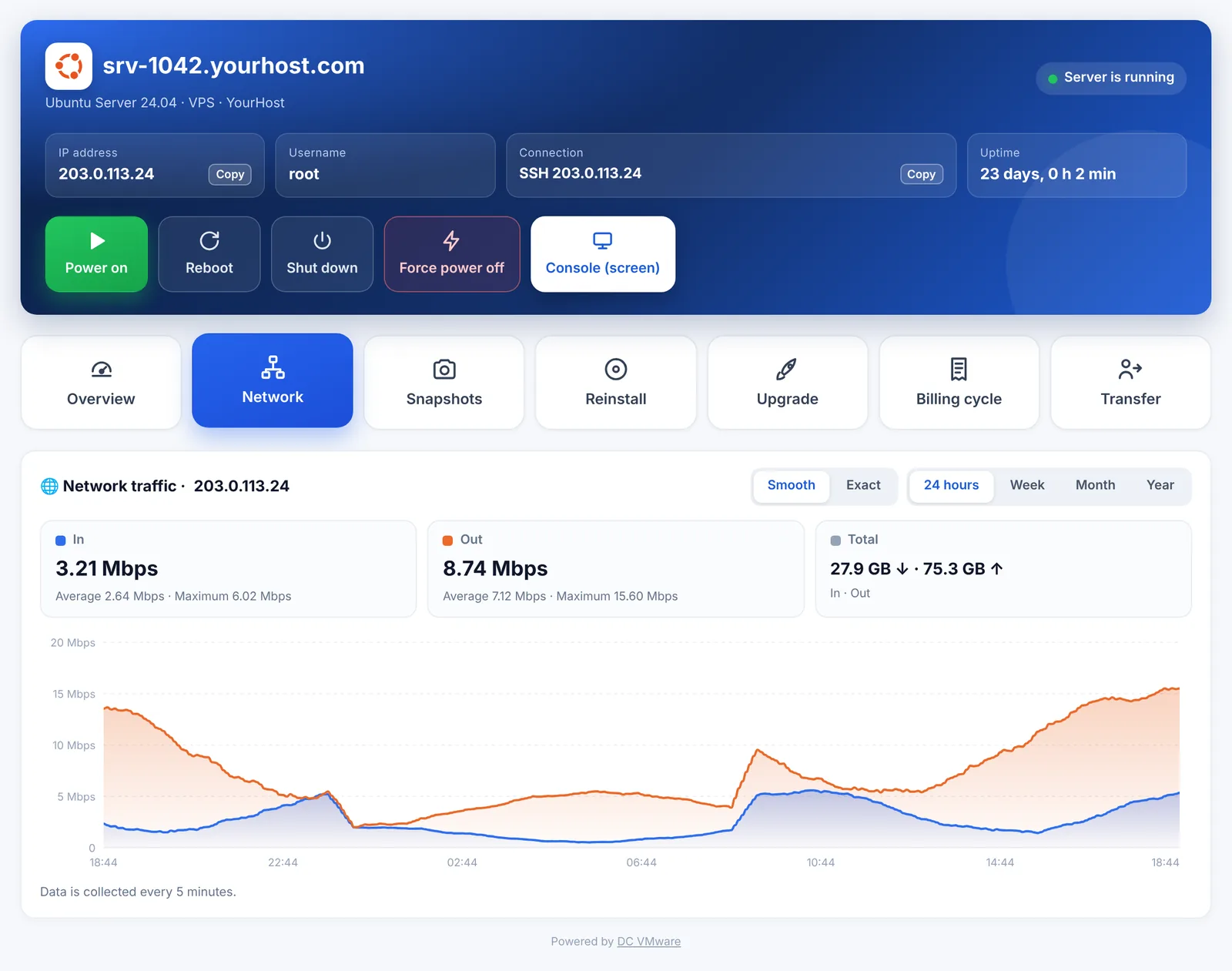
DC VMware client area: Network

Traffic graphs per server

In and out traffic for 24 hours, a week, a month or a year, with the average, the peak and the total.

  • Data saved every 5 minutes
  • Smooth or exact view
  • Works on any screen size
yourhost.com/clientarea.php?action=productdetails
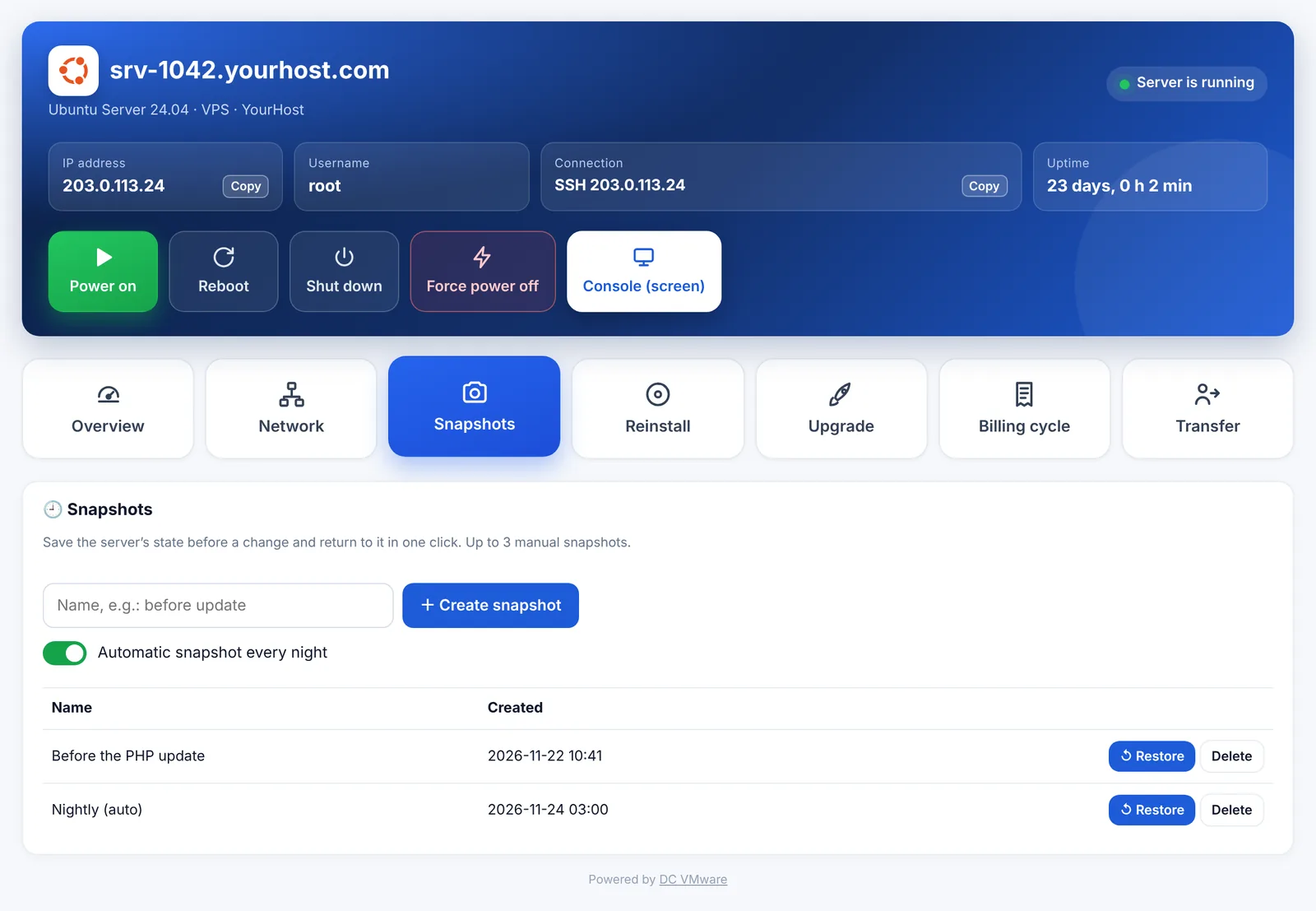
DC VMware client area: Snapshots

Restore points in one click

Clients save the server before a change and go back to it with one click. Optional automatic snapshot every night.

  • Limit per plan
  • Nightly automatic snapshot
  • Restore and delete with a clear warning
yourhost.com/clientarea.php?action=productdetails
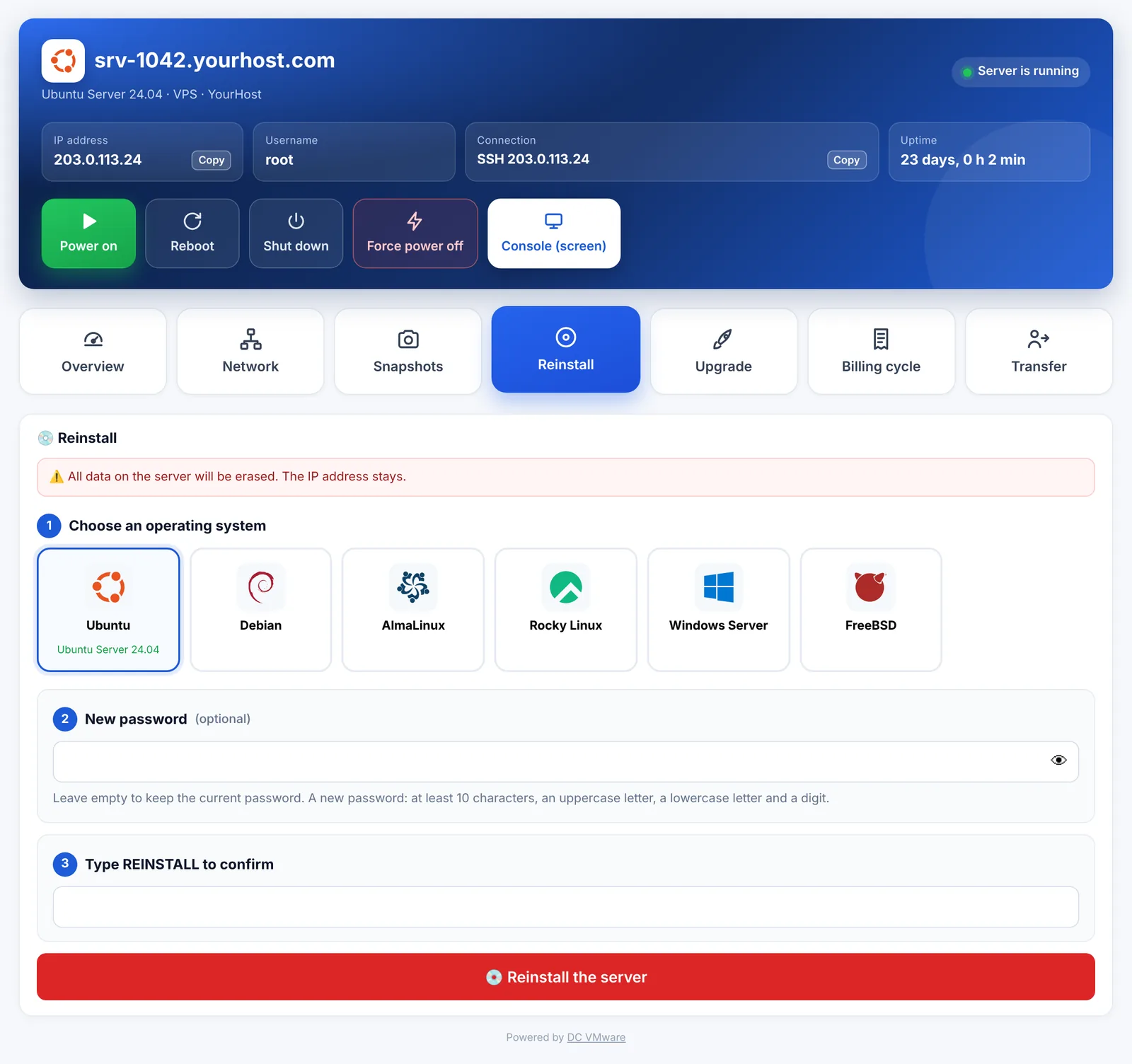
DC VMware client area: Reinstall

A clean system in minutes

Clients pick a system by its logo and version. The IP stays the same, and they can set a new password.

  • Only the systems you allow
  • Typed confirmation, no accidents
  • Linux, FreeBSD and Windows
yourhost.com/clientarea.php?action=productdetails
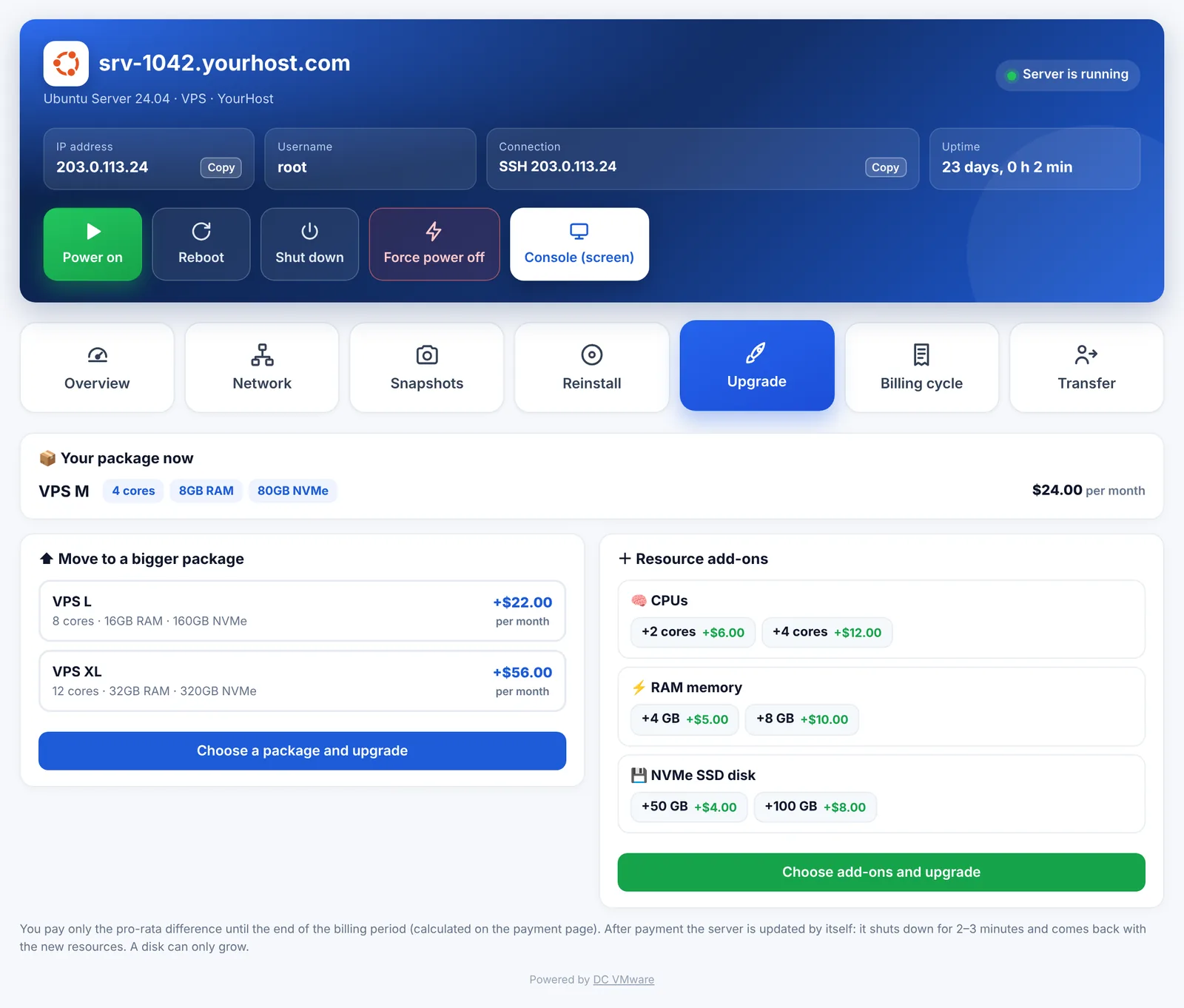
DC VMware client area: Upgrade

Upgrades that sell themselves

A bigger plan or extra CPU, RAM and disk, with the price difference shown. After payment the server updates itself.

  • Pro-rata price by WHMCS
  • Resized automatically
  • Disk only grows, never shrinks
yourhost.com/clientarea.php?action=productdetails
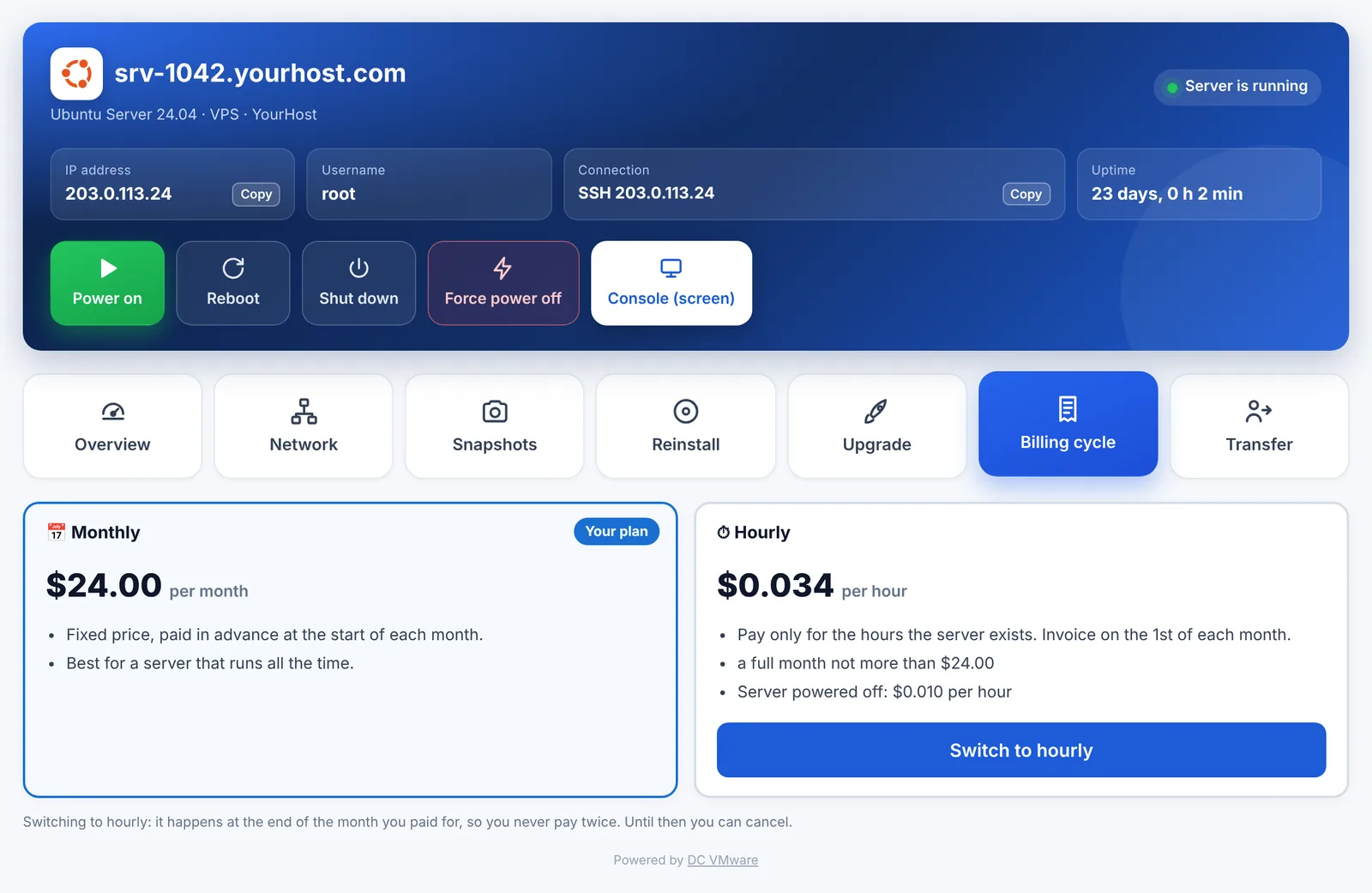
DC VMware client area: Billing

Monthly or by the hour

Clients choose how to pay. Hourly use is counted every minute and billed on the 1st of each month.

  • A full month never costs more than monthly
  • Cheaper rate while powered off
  • Switch at the end of the paid month
yourhost.com/clientarea.php?action=productdetails
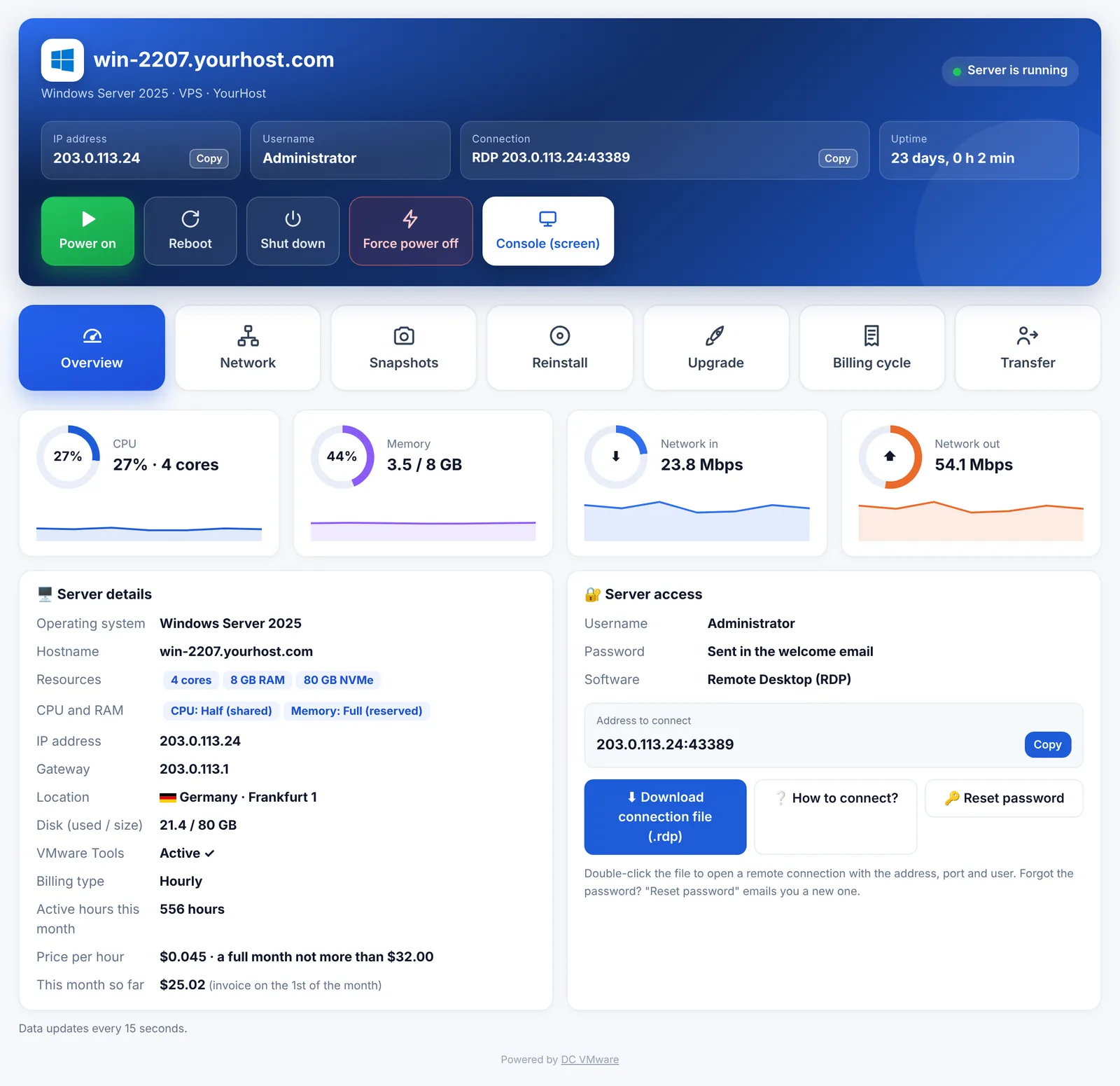
DC VMware client area: Windows

Windows servers with RDP

A ready .rdp file, the RDP port and the Administrator user. Windows keys come from your license bank.

  • Download the connection file
  • Keys activated automatically
  • Windows Server 2016 to 2025
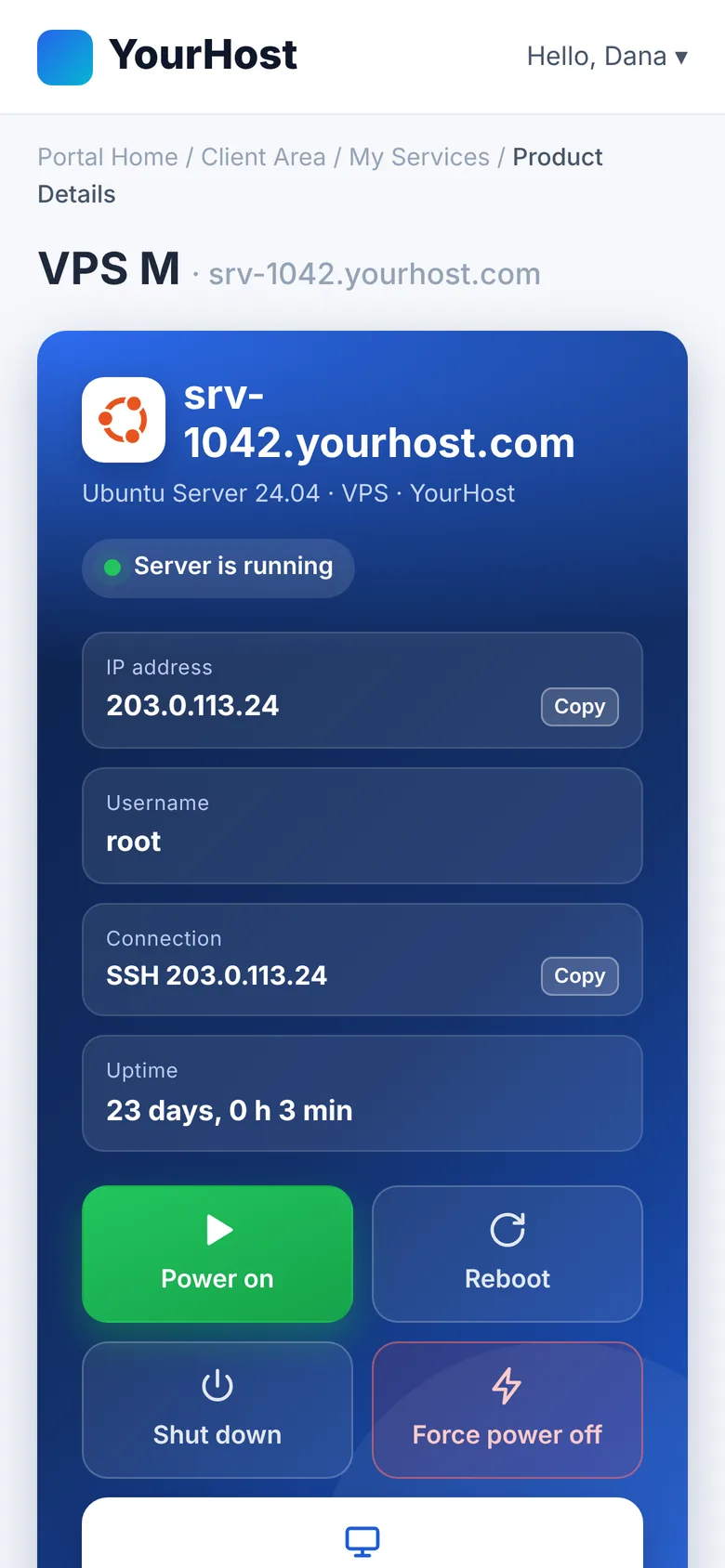
DC VMware client area on a phone

Made for phones too

The same panel on a phone: big buttons, clear status and every tab.

  • No zoom and no side scroll
  • All actions available
  • Light and fast
How it works

One order. One ready server.

No manual work between the payment and the login. The module does every step on your vCenter.

🛒

The client orders

Picks a plan, a location and a system on your WHMCS order page.

💳

WHMCS takes payment

Monthly or by the hour, with add-ons for CPU, RAM, disk and backup.

⚙️

The server is built

Cloned from your template, with a free IP from the pool and a new password.

📧

Login is sent

The client gets an email and can open the server in the client area.

Features

Everything a VMware host needs

Built and used every day by DNS Cloud for its own VMware servers.

⚡

Automatic servers

A new order builds the server from a vCenter template: CPU, RAM, disk, IP, password, name and RDP port.

💿

Templates from ISO

The module builds its own templates from an ISO on your datastore. No manual template work.

📥

Add from the list

One click downloads the official ISO, checks its SHA-256, uploads it and builds the template.

🌐

IP pools

Address ranges per network and per farm. Every new server gets a free address on its own.

🗺️

Server farms

Several datacenters and several vCenters. The client picks a location on the order page.

🖥️

Browser console

Power, console, reinstall, password reset, snapshots, usage graphs and upgrades in the client area.

⏱

Hourly billing

Monthly or by the hour, counted every minute. A powered-off server can cost less.

➕

Add-ons

Extra CPU, RAM and disk, daily backup, TSplus and Microsoft Office, all billed by WHMCS.

🔑

Windows license bank

Product keys are given to new Windows servers and activated automatically.

🔁

Import with undo

Move existing VMware servers from another module into DC VMware, and undo it if needed.

✉️

Emails and order page

Ready email templates and a custom order page with locations and systems.

🌍

10 languages

English, Hebrew, Arabic, German, Spanish, French, Italian, Dutch, Portuguese and Russian.
For you

One dashboard for all your vCenters

See every server, job, IP pool and template in one place inside WHMCS.

  • Jobs run in the background, with a clear status for each one
  • IP pools show what is free and what is in use
  • Templates are built and checked by the module
  • Updates arrive as a pop-up: click "Update now", no files to upload
WHMCS Admin › Addons › DC VMware
DashboardGuideOperating SystemsLocationsIP AddressesPlansUpdates
Servers128
Running119
Free IPs214
Templates14
⚙️ Create srv-1042 · Ubuntu 24.04Done
💿 Build template · Windows Server 2025Running
⟳ Reinstall srv-0977 · Debian 13Waiting
◷ Snapshot srv-0811Done
For your clients

A real console in the browser

Clients open their server screen right from the client area. No VPN, no extra software, and vCenter stays closed to the internet.

  • Start, restart, stop and reinstall
  • Restore points (snapshots) and password reset
  • CPU, RAM and network graphs
  • Upgrade the plan and switch billing type
Console · srv-1042
Ubuntu 24.04 LTS srv-1042 tty1

srv-1042 login: root
Password:
Welcome to Ubuntu 24.04 LTS

root@srv-1042:~# nproc && free -h | head -2
4
Mem:  7.8Gi  412Mi  7.1Gi
root@srv-1042:~# ▌
Systems

Linux, BSD and Windows templates

Ubuntu 22.04 / 24.04 / 26.04Debian 12 / 13AlmaLinux 8 / 9 / 10Rocky Linux 8 / 9 / 10CentOS StreamFreeBSD 14 / 15Windows Server 2016 – 2025Windows 10 / 11
Pricing

Simple pricing. Every feature included.

One license for one WHMCS. Both plans have every feature and every update.

Standard

Every feature, with a small "Powered by DC VMware" line.

$7.90/ month
Billed monthly
Buy Standard
  • All features and templates
  • Unlimited servers and vCenters
  • Free updates with one click
  • 10 languages
  • "Powered by DC VMware" line shown
WHITE LABEL

Unbranded

Every feature, with only your brand. No DC VMware name anywhere.

$9.00/ month
Billed monthly
Buy Unbranded
  • All features and templates
  • Unlimited servers and vCenters
  • Free updates with one click
  • 10 languages
  • No branding in client area and emails

Prices in USD, before VAT. Upgrade from Standard to Unbranded at any time.

Get started

Installed in 10 minutes

The full guide and your license key wait on your license page after you buy.

01

Buy a license

Pick Standard or Unbranded. Your key (DCVM-…) is ready right away.

02

Upload the files

Download the ZIP and upload the modules folder to your WHMCS folder.

03

Activate and paste

Activate the addon, open "Module license" and paste your key.

04

Add your vCenter

Add vCenter as a server. The built-in guide walks you through the rest.

WHMCS 8.xPHP 7.4 – 8.5 + ionCubevCenter 7.0 U2+ / 8.0ESXi 7.0 / 8.0Web server Apache
FAQ

Questions

Which VMware versions are supported?

vCenter Server 7.0 Update 2 and later, and 8.0, with ESXi 7.0 and 8.0 hosts. vCenter and ESXi do not need to be open to the internet; only your WHMCS server talks to them.

Do I need ionCube?

Yes. The module is encoded, so your server needs the free ionCube Loader for your PHP version. Most hosting panels have it ready.

How do updates work?

When a new version is out, the module shows a pop-up in WHMCS. Click "Update now" and it updates itself, with a backup and a way back. No files to upload.

What is the difference between Standard and Unbranded?

Both have every feature. Standard shows a small "Powered by DC VMware" line in the client area and emails. Unbranded shows only your brand.

Can I move to another server?

Yes. The license is locked to your WHMCS domain and folder. Click "Reissue License" on your license page and it locks to the new place at the next check.

Can I import servers from my current VMware module?

Yes. Existing VMware servers of another module can be moved into DC VMware, and the move can be undone.

Start selling VMware servers today

Every feature, free updates, from $7.90 a month.

See pricing →